
Key takeaways
- Workflow automation means using software to run repeatable steps when a trigger happens.
- The best automation starts with the business problem, not the tool.
- Restaurants, roofers, clinics, and trades can use automation for missed calls, quote follow-up, review requests, reminders, and reporting.
- Low-risk tasks can run automatically. Higher-stakes tasks should keep a human approval step.
- BC businesses still need to think about privacy when customer data moves between apps.
Quotable answer
Workflow automation is software that runs repeatable business steps when something happens, such as a missed call, form submission, booking request, or completed job. For a small business, the point is not to automate everything. The point is to fix the repetitive work that costs leads, time, or trust.
What is workflow automation? For a small business, it is the difference between a lead sitting unanswered and a system that follows up while the owner is still on a roof, in the kitchen, or with a customer.
The mistake is thinking automation starts with a tool. It does not. It starts by listing the problems inside the business. A restaurant has different problems than a roofer. A pet care business has different problems than an insulation contractor. The workflow should be built around the problem, not around a shiny app.
That is how I think about automation at IshaanEx Digital. AI without directions is clueless. The work is giving it the right guardrails, the right business context, and a human review step when the decision matters.
What is workflow automation in plain English?
Workflow automation is the process of setting repeatable steps to run inside the software your business already uses. Zapier describes it as automating repeatable tasks within your apps, while Microsoft explains that workflow tools use rule-based logic: if one thing happens, the system does the next thing. Sources: Zapier workflow automation guide and Microsoft Power Automate workflow tools.
A workflow has steps. Automation makes those steps happen without someone manually copying, pasting, texting, checking, or reminding every time.
Simple example: a customer fills out a quote form. The system adds the lead to your CRM, texts the owner, sends the customer a reply, creates a task, and reminds the team if nobody follows up.
What exactly is workflow automation made of?
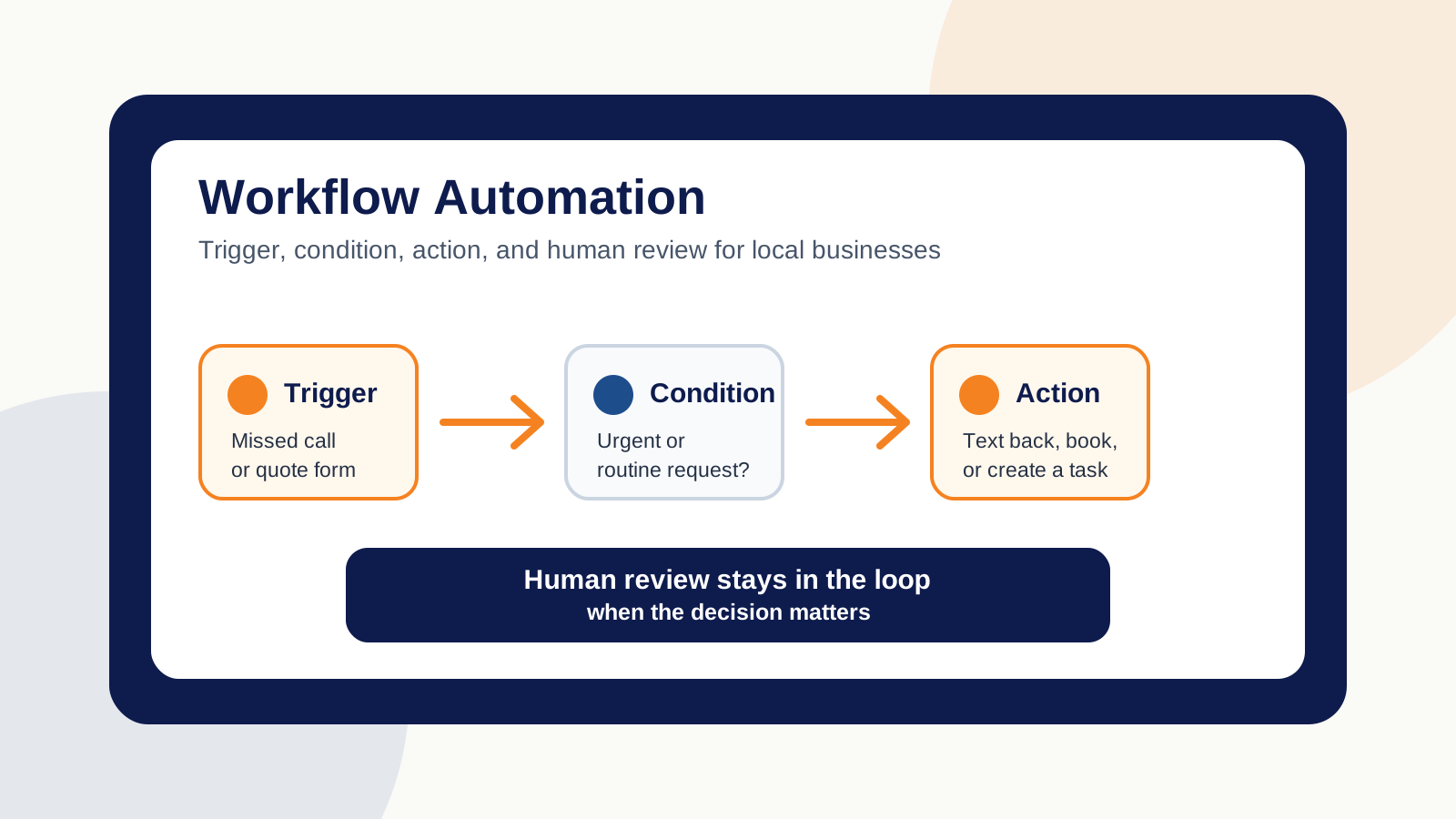
A useful workflow has four parts: trigger, condition, action, and review. Zapier calls a trigger the event that starts the automation. HubSpot also builds workflows around enrollment triggers and actions. Sources: Zapier key concepts and HubSpot workflow setup guide.
| Part | Plain-English meaning | Small-business example |
|---|---|---|
| Trigger | The thing that starts the workflow | A missed call comes in after hours |
| Condition | The rule that decides what happens next | If it is urgent, text the owner. If it is routine, book a callback |
| Action | The task the system performs | Send a text, create a lead, update the calendar |
| Human review | The approval step before sensitive changes go live | Owner approves a public Google Business Profile update |
The human review part matters. A low-risk workflow can send an appointment reminder without asking you. A higher-stakes workflow should pause before posting publicly, changing a category, issuing a refund, or sending a sensitive customer message.
What is a workflow automation example for a restaurant?
A restaurant workflow could start with a missed call. The system checks current context: open hours, table availability, patio status, and booking rules. Then it texts the caller or routes them to a reservation flow.
Context is what makes it work. A basic bot that says "we will call you back" is not enough. If the customer wants a table for six tonight, the workflow needs access to live information before it replies.
That same restaurant could also automate review requests after a booking, staff task reminders before a dinner rush, and weekly reporting. Microsoft lists automated follow-ups, replies, invoicing, reminders, and task assignment as common workflow examples, which maps neatly to local hospitality work. Source: Microsoft workflow automation examples.
What is a workflow automation example for a roofer?
A roofer workflow could start when a homeowner calls about a leak and nobody picks up. The system checks the calendar, asks whether the roof is leaking now, creates a lead, and sends the right message based on urgency.
If it is an active leak, the owner or on-call crew gets a text. If it is a routine estimate, the customer gets a booking link. If photos are needed, the workflow asks for roof photos before the callback.
That is the difference between a gimmick and a useful automation. The workflow is not "AI answers the phone." The workflow is "the business stops losing leads while the crew is busy."
First-party note from IshaanEx Digital
Harman's rule: start with the business problem. A restaurant, roofer, clinic, and contractor do not need the same automation. They need their own bottlenecks mapped first, then one or more workflows built around those problems.
What is the difference between workflow automation and business process automation?
Workflow automation usually handles a specific sequence of steps. Business process automation is broader. Microsoft describes business process automation as building, managing, and improving workflows across a larger business process. Source: Microsoft business process automation benefits.
| Type | Scope | Example |
|---|---|---|
| Workflow automation | One repeatable sequence | Missed call to text reply to calendar booking |
| Business process automation | A larger system made of many workflows | Lead intake to quote to job scheduling to invoice to review request |
For a small business, the wording matters less than the result. If the system fixes missed leads, slow follow-up, and repeated manual work, it is doing the job.
Which tasks should a small business automate first?
Start with tasks that are repetitive, rules-based, and tied to money or trust. Do not start with the most complicated thing in the business. Atlassian recommends starting small and scaling gradually, with input from the people who use the workflow. Source: Atlassian workflow automation guide.
- Missed-call text-back
- Quote request follow-up
- Appointment reminders
- Review requests after a completed job
- New lead notifications
- Invoice or payment reminders
- Customer intake form routing
- Weekly reporting for leads, calls, rankings, or bookings
Free Download: Workflow automation checklist for local businesses - a problem-first worksheet to decide what to automate, what to leave manual, and where a human approval step belongs. Use the checklist in this guide to score your first workflow before building it.
What are the risks of workflow automation?
The biggest risk is automating a broken process. If your lead intake is unclear, automation will move that confusion faster. If your calendar is out of date, the system can offer times you cannot honour.
The second risk is privacy. The Office of the Privacy Commissioner of Canada says PIPEDA sets rules for how private-sector organisations collect, use, and disclose personal information in commercial activity. It also notes that BC has its own substantially similar private-sector privacy law, while PIPEDA applies when personal information crosses provincial or national borders. Source: PIPEDA requirements in brief.
That matters because many automation tools are cloud-based. If your workflow moves names, phone numbers, booking details, health notes, payment records, or customer messages between apps, treat that data carefully.
How do you set up your first automated workflow?
Start with one problem. Write the current steps on paper. Circle the steps that are repetitive, rules-based, and low risk. Then decide where a person still needs to approve the result.
- Pick one problem, such as missed calls or quote follow-up.
- Map the current workflow from start to finish.
- Choose the trigger that starts it.
- Add the actions and conditions.
- Add a fallback path when the system is not sure.
- Test it with fake leads before real customers touch it.
- Review the first week manually before trusting it.
This is also where an outside builder can help. IshaanEx Digital builds AI automation services for local service businesses, including Abbotsford businesses. The first step is always the same: find the bottleneck before picking the tool.
How does IshaanEx Digital think about AI workflow automation?
I use AI heavily in my own work, but I do not let it run unchecked. My rule is simple: direction, guardrails, human review. That is the difference between useful AI and generic output.
One workflow I built for my own agency work reviews a client's Google Business Profile performance. If a service drops, the agent can prepare a Google post, connect the post to the relevant service page, check whether services or categories need attention, and give me a brief. I review and approve the change before anything high-stakes goes live.
That same thinking applies to AI search optimisation, Google Business Profile optimisation, and custom workflow builds. Low-risk repetition can run. Public-facing decisions should ask first.
Frequently asked questions about workflow automation in Abbotsford
What exactly is workflow automation?
Workflow automation is software that runs a repeatable set of business steps after a trigger happens. The trigger could be a form submission, missed call, booking, payment, or completed task.
What is an example of workflow automation?
A simple workflow automation example is a quote request that creates a CRM lead, texts the owner, replies to the customer, and creates a follow-up task. The business does not need to copy the same details into four places.
Can ChatGPT create workflows?
ChatGPT can help plan a workflow, write prompts, draft messages, and explain logic. It still needs the right tools, connected data, privacy guardrails, testing, and human review before a real business should use it with customers.
What should a local business automate first?
Start with a repeated task that costs money when it is missed. For many Abbotsford service businesses, that means missed-call follow-up, quote requests, review requests, or appointment reminders.
Is workflow automation safe for customer data?
It can be safe if the workflow only collects the data it needs, uses trusted tools, limits access, and keeps a human review step for sensitive decisions. BC businesses should also understand privacy rules before sending customer data between apps.
Do I need one workflow or multiple automations?
It depends on the problems. One business may need one missed-call workflow. Another may need separate workflows for leads, reviews, payments, and reporting. Map the problems first, then decide.

Written by
Harman Chahal
Harman Chahal is the owner of IshaanEx Digital, an Abbotsford digital agency that builds websites, local SEO systems, AI search optimisation, and AI automation for Lower Mainland service businesses. His work combines custom-coded websites, Google Business Profile systems, and human-reviewed AI workflows.