
n8n vs Zapier vs Make is usually presented as a feature contest. That misses the decision a small business actually faces: what does the workflow do, how often does it run, and who owns it when something fails?
This guide starts with the billing meter, then compares maintenance, code, and hosting. It also adds an option most comparisons skip: building the automation directly with a coding agent such as Codex or Claude Code.
If you have not read the plain-English version of what these tools do, start with what is workflow automation and come back.
n8n vs Zapier vs Make: what is the actual difference?
All three connect apps, receive a trigger, move data, and run actions. All three now include AI features. All three can also run custom code: n8n has code nodes, Zapier has Code by Zapier, and Make has Make Code.
The difference is the path they make easiest. Zapier has the widest ready-made app catalogue — its official site lists more than 9,000 integrations — and is usually the quickest handoff for a short trigger-and-action flow. Make gives you a visual canvas that is good at showing routers, filters, and several branches. Its product page lists 3,000+ pre-built apps plus custom API and code options.
n8n asks for more technical comfort but gives you a managed Cloud plan or a self-hosted Community Edition. That choice changes where the automation runs, who controls its infrastructure, and who handles updates, backups, credentials, and uptime.
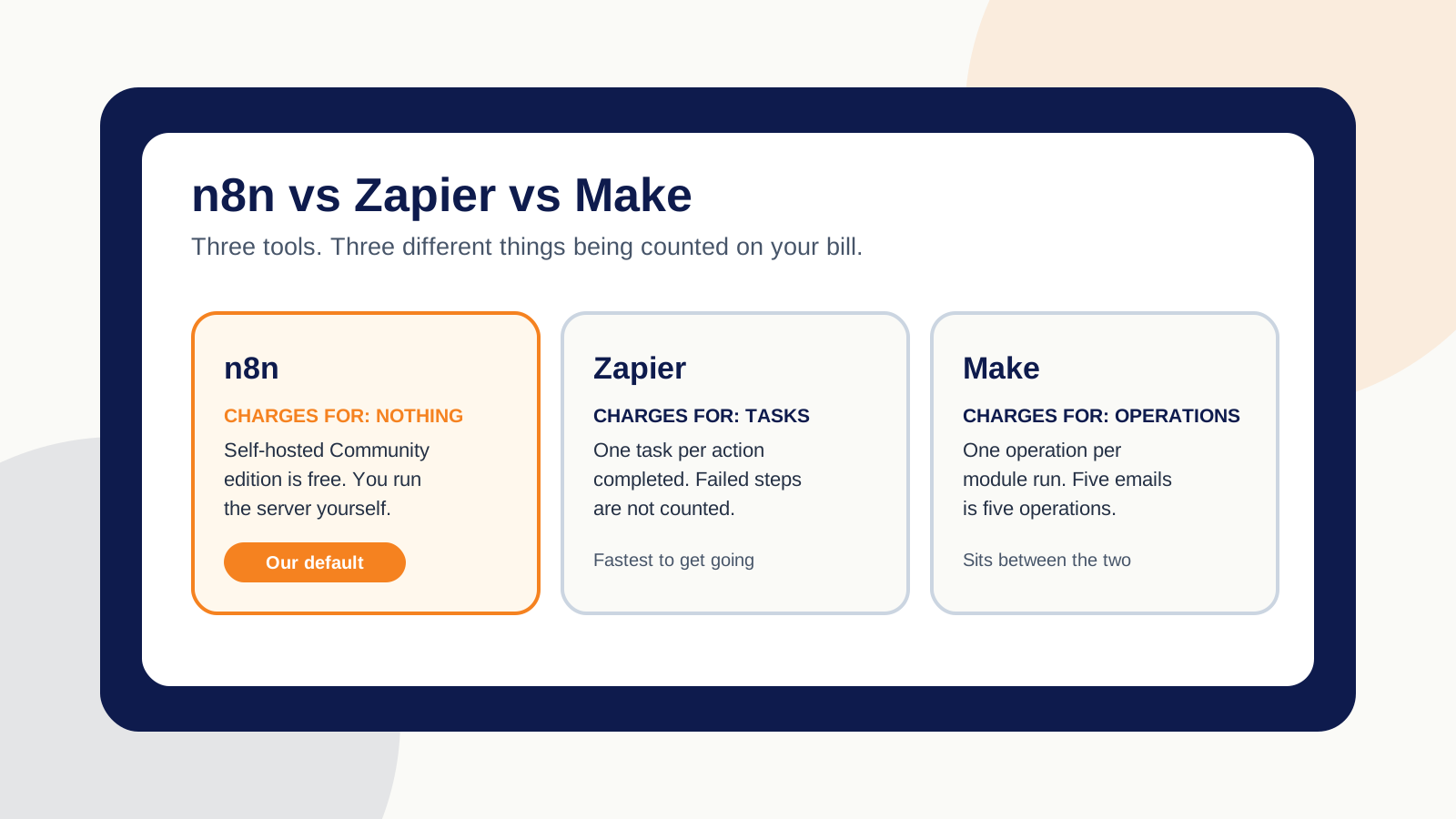
How does each platform count usage?
The headline plan prices are not a clean comparison because each platform counts a different unit. API fees and AI model charges can also sit outside the platform bill.
Zapier counts tasks
Zapier defines a task as a successful action. Its current task guide says triggers, Filters, Paths, and steps that fail or halt do not use standard tasks. A Code by Zapier step normally uses one task per run, with more possible for extended runtime.
A workflow with several successful actions can therefore use several tasks each time it runs. That is easy to budget when the flow is short and occasional. It matters more when a workflow runs all day.
Make bills in credits
Make replaced “operations” with credits as its billing unit. For most non-AI apps, one operation uses one credit. Some built-in AI features can also use credits based on tokens, the model, or other usage factors.
An operation still means one module run. Make’s own example says a module that sends five emails creates five operations. A four-module diagram can therefore consume far more than four credits when it loops over a list of records.
n8n Cloud counts full workflow executions
n8n’s paid plans count one full workflow run as an execution, no matter how many nodes are inside it. Self-hosted n8n Community Edition has no n8n platform fee per execution. It is not cost-free: you still pay for the server, outside APIs, AI models, monitoring, and the time needed to keep it running.
The trade is useful when a long workflow runs often and someone technical can own it. It is a poor bargain when a small hosted flow would save more maintenance time than the server saves in fees.
How do n8n, Zapier, and Make compare?
| n8n | Zapier | Make | |
|---|---|---|---|
| Billing unit | Full workflow executions on Cloud; no platform execution fee on Community Edition | Tasks — usually one per successful action | Credits — usually one per operation for non-AI apps; some AI usage varies |
| Who hosts it | You, or their Cloud plan | They do | They do |
| Code option | JavaScript and Python code nodes | Code by Zapier for JavaScript and Python | Make Code for JavaScript and Python |
| App catalogue | Smaller native catalogue; HTTP and community nodes fill gaps | 9,000+ integrations | 3,000+ pre-built apps |
| Learning curve | Most technical | Gentlest for a short flow | Middle; visual branching takes practice |
| Main ownership risk | Self-hosters own infrastructure and uptime | Task use grows with successful actions | Loops and AI features can raise credit use |
| Best fit | Technical workflows, self-hosting, or long high-frequency flows | Fast setup, common apps, simple handoff | Hosted visual workflows with branches and data mapping |
How to read the table: billing, hosting, code, and app counts come from the platforms’ current documentation. Learning curve, ownership risk, and best fit are our editorial assessment based on those facts and current operator discussions.
Is n8n obsolete now that coding agents can build automations?
No. Codex and Claude Code add a fourth route; they do not erase the other three. A coding agent can help write the scheduler, API calls, filters, tests, database logic, and Telegram messages for a custom automation. Someone still has to decide the rules, secure the credentials, deploy it, watch the logs, and repair it.
Custom code is worth considering when the workflow has unusual state, several validation rules, or logic that becomes harder to understand as a canvas full of nodes. It also fits a technical owner who wants the code in version control and can test changes before release.
A visual platform is often better when the task uses common business apps and a non-developer needs to inspect or change it later. Zapier, Make, and n8n also give you credential handling, run histories, retries, and connectors that a custom build must provide for itself.
What did a custom flight-monitor agent teach us?
I built a flight-monitoring agent in Codex for my own family travel search. It runs at 6:00 in the morning and 6:00 in the evening, checks a flight-search API against the requirements I gave it, and sends the result to a Telegram bot on my phone.
The message includes the route, dates, airlines, flight numbers, journey time, displayed total, and a link where I can check the current price and book. The useful part is not the notification. It is what happens when the search result is incomplete.
The working flow
“LIVE FLIGHT PREVIEW — NOT A BUY ALERT”
The real Telegram result used that warning because the search provider did not confirm the required checked bags, cabin bag, and final price. The agent still shared the flight, but it refused to label it as a qualifying buy alert until a person verified those details.
That is the reason I preferred the coding-agent route for this build. I could describe the requirements, add a schedule, and make the warning logic explicit. It does not prove that custom code is always better. It proves that n8n, Zapier, and Make are not the only choices.
It also follows the rule I use across my AI work: direction, guardrails, and human review. I do not treat the first generated result as the final answer. The agent narrows the work; I verify the decision before anything important happens.
A travel agency could use the same pattern for saved client searches, provided it has permission to use the flight data source and keeps a person in control of fare, baggage, and booking checks. The automation narrows the search; it should not pretend an unverified fare is ready to buy.
What does the n8n licence actually allow?
n8n is fair-code rather than fully open source. Its Sustainable Use License permits internal business use and non-commercial or personal use.
In plain terms: running n8n to automate your own operations is fine. Packaging it up and letting your customers connect their accounts and build workflows inside it is a different thing, and you should read the licence before you plan a business around it.
This rarely changes a local service business’s internal workflow. It matters if you plan to make n8n itself available to customers as part of a competing hosted product.
Which tool fits your workflow?
You do not need to pick a logo before you describe the job. Start with frequency, judgement, maintenance, and the number of steps. The four-question chooser below gives you a starting point, not a buying decision.
Four questions that narrow it down
- How often does it run? A few times a week suits a hosted plan. Frequent runs or lists of records make execution-based pricing or self-hosting worth comparing when someone technical can own it.
- Does anything need judgement? Reading, summarising, drafting, or classifying changes the build and the cost.
- Who fixes it when it breaks? If the honest answer is nobody in-house, a hosted plan or a maintained build is worth the fee.
- How many steps and branches are there? A short linear flow and a long branching process should not be priced or maintained the same way.
What ownership means after launch
A workflow needs named accounts, documented credentials, an expected output, and someone who checks failures. Those details matter more than a builder’s favourite logo.
My own rule is simple: let the agent handle repeatable production, then keep the final verification with a person. If a workflow already works, document it before deciding whether a rebuild would solve a real problem.
When the tool is not the real question
Two situations come up often enough to name.
The job has no judgement in it. If a workflow is pure rules — move this field there, send that reminder — you do not need an AI step at all, and adding one makes it slower to debug and more expensive to run. The plain guide to how AI automation works sets out where the thinking step genuinely earns its place.
The process underneath is broken. Automation makes an existing process faster, including a bad one. If quotes are inconsistent by hand, they will be inconsistent automatically. Decide what a good output looks like first; the platform argument can wait.
Both questions are worth more than a feature count, and neither is settled by a pricing page.
Frequently asked questions
Is Make or n8n better?
Make is usually easier when a team wants a hosted visual canvas for branching workflows. n8n is usually the better fit when a technical owner wants self-hosting, full-workflow execution billing in n8n Cloud, or deeper custom logic. The better choice depends on volume, maintenance, and who will own the build.
Is anything better than n8n?
Yes, for some jobs. Zapier can be better for a short workflow that needs a ready-made app connection and a quick handoff. Make can be better for a visual, hosted workflow with several branches. Custom code can be better when the workflow needs unusual rules, tests, or deployment control.
Can Zapier replace n8n?
Zapier can replace n8n for many common trigger-and-action workflows, and it also supports JavaScript and Python through Code by Zapier. It is not a direct replacement when self-hosting, infrastructure control, or a highly customised code path is the main requirement.
Is n8n obsolete now?
No. Coding agents such as Codex and Claude Code add another way to build automation, but they do not remove the need for visual workflows, managed integrations, credentials, logs, retries, and maintenance. n8n remains useful when a visual workflow and technical control need to live together.
How much is n8n per month?
The self-hosted Community Edition has no n8n platform fee, but you still pay for hosting, outside APIs, AI models, and maintenance. n8n Cloud is paid by workflow-execution allowance. Check the live pricing page before budgeting because tiers and included usage can change.
What is the best AI automation tool?
There is no single best tool. Use Zapier for a simple, low-frequency flow; Make for visual branching without running a server; n8n for a technical visual workflow with more control; or custom code when the logic does not fit a canvas cleanly. Ownership after launch matters as much as features.

Harman Chahal
Harman is the founder of IshaanEx Digital, an Abbotsford agency specialising in local SEO, custom-coded websites, AI search optimisation, and AI automation for Lower Mainland service businesses. He builds and reviews the workflows himself and works with clients in English and Punjabi.
About Harman and IshaanEx DigitalFree call
Tell us the job, and we will tell you the tool.
Send the apps involved, how often the task runs, and what a correct result must include. We will recommend a build route, flag the likely usage meter, and tell you whether a plain rule is enough.
Based in Abbotsford, working across the Fraser Valley and Lower Mainland. Our published pricing and the workflows we build sit on the Abbotsford AI agency page, and the wider service is on AI automation services.