

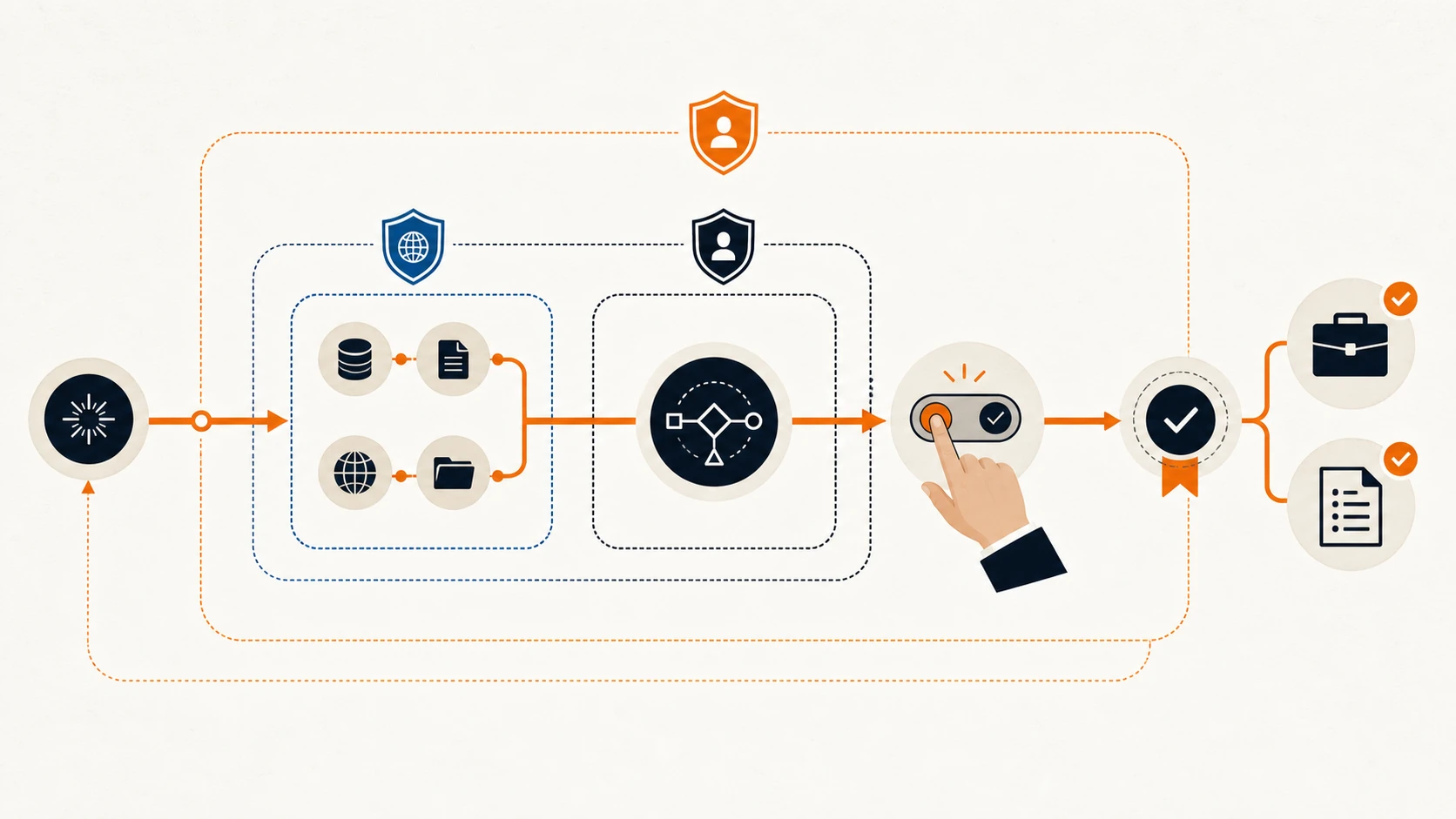
How does AI automation work when the output can look polished and still be dangerously wrong? I learned by building a legal-document drafting automation that cited rules and case law that did not exist. The failure is a useful way to understand both the appeal and the risk of AI automation.
The useful version is not an all-knowing robot employee. It is a controlled process: receive a trigger, collect approved information, make a bounded decision or draft, check the result, ask for human approval when the stakes call for it, complete an action, and record what happened.
What is an AI agency? It is a team that maps those processes, connects the permitted tools and data, tests the failure paths, and keeps responsibility with the people running the business. The agency’s value is not simply access to a model. It is the workflow design around that model.
Key takeaways
- AI automation combines a repeatable workflow with AI’s ability to interpret language, classify information, draft content, or choose between defined actions.
- A trigger starts the process. Data and instructions provide context. The system then produces a result, requests approval, or acts within its permissions.
- Traditional automation follows fixed rules. AI helps when the input is messy or language-heavy, but it also introduces uncertainty.
- Guardrails should limit the sources the system may use, the actions it may take, and the conditions that require a person to step in.
- In legal, medical, financial, or other high-stakes work, AI should assist a qualified professional rather than become the final authority.
Answer block: AI automation works by connecting an AI model to a defined business workflow. A trigger supplies data, the model interprets or drafts something, rules and verification steps check the result, and the system either takes an approved action or sends it to a person. Logs record the sources, decisions, errors, and outcome.
How does AI automation work from start to finish?
Every reliable AI automation has a path through the business. The model is only one part of that path.
Salesforce defines AI automation as the use of machine learning, natural language processing, and related technologies to handle tasks and streamline workflows. That is a useful starting point, but the workflow matters as much as the intelligence. A model that can read an email is not yet an automation. It becomes one when the business decides what should happen after the email arrives. Salesforce’s AI automation guide explains the distinction in more detail.
A practical workflow has seven parts.
- Trigger: Something happens. A lead fills out a form, a customer sends an email, a document enters a folder, or a staff member requests a draft.
- Input: The automation collects the information it is allowed to use. This may include form fields, a customer record, an approved PDF library, or a set of internal instructions.
- Interpretation: AI classifies, extracts, summarises, drafts, or selects from permitted options. Fixed rules can handle any step that does not require judgment.
- Verification: The system checks required fields, source references, formatting, confidence, and business rules. High-stakes claims may need a second source or an official record.
- Human checkpoint: A person reviews the result when the decision is consequential, uncertain, unusual, or irreversible.
- Action: The workflow sends the approved email, updates the CRM, creates a task, saves a draft, or routes the item to another system.
- Audit log: The automation records what it received, which sources it used, what it produced, who approved it, what action occurred, and where it failed.
The admin layer around the model is what makes the workflow usable. In a recent r/automation discussion, builders named clear inputs, named outputs, review gates, failure conditions, visible logs, and record-level retries as the unglamorous work that keeps an automation running. Those controls matter more than a clever prompt when a workflow reaches customers or changes business records.
Interactive workflow
Follow one automation from trigger to audit log
Select a step to see what it does and what can go wrong there.
Trigger
A form arrives, a file enters a folder, or a staff member requests a draft. The event starts a defined process.
Watch for: duplicate events or a trigger that fires before the required information exists.
What is AI automation, and how is it different from traditional automation?
Automation is possible without AI. A thermostat, scheduled invoice reminder, or form-to-spreadsheet connection can follow fixed instructions without interpreting language or predicting anything.
AI earns its place when the input varies. A customer may describe the same problem twenty different ways. A contract may place the same clause under different headings. A lead may be qualified through a mix of short answers and free-form notes. AI can help turn that messy material into structured information that ordinary workflow rules can use.
| Approach | How it works | Good fit | Main limitation |
|---|---|---|---|
| Traditional automation | Follows fixed if/then rules | Stable, repetitive tasks with predictable inputs | Breaks when the input falls outside the rule set |
| AI-assisted automation | AI interprets or drafts; rules and people control the action | Emails, documents, classification, summaries, first drafts | The output can be plausible but wrong |
| Agentic automation | AI plans steps and uses permitted tools to pursue a goal | Multi-step work with changing paths | Wider permissions create wider operational risk |
The choice is not a maturity ladder where every business should reach autonomous agents. A simple rule is often cheaper, easier to test, and more reliable. AI should enter only where interpretation creates enough value to justify the uncertainty it adds.
That is also why our separate guide to workflow automation keeps ownership of the broader process topic. AI workflow automation is one branch of that discipline, not a replacement for it.
What gives an AI automation authority to act?
An AI automation can act only because a person connects it to business software and grants specific permissions. Those credentials define what the workflow may read, draft, send, update, or delete. Intelligence does not create authority; access settings do, which is why permission design belongs in the workflow plan from the start.
An automation may receive an API key, a connected account, a database role, or access to a business application. Those credentials determine whether it can read a record, create a draft, send a message, issue a refund, or change a customer file. The model does not acquire that authority by being intelligent. A developer or business owner grants it.
This makes permission design a business decision, not an IT footnote. An email-drafting assistant may need permission to read a support ticket and save a draft. It does not necessarily need permission to send the message. A lead-triage workflow may update a status field without being allowed to delete the record or change the quoted price.
Salesforce’s current guardrail guidance makes the same architectural point: permissions, audit trails, escalation logic, and human oversight should travel with the system when an agent can take real-world actions. Its examples separate human-in-the-loop approval before action from human-on-the-loop monitoring during lower-risk operation. The guardrail guide is vendor material, but the permission model is broadly applicable.
A safe starting rule is least privilege: give the automation only the access needed for its assigned task. Add an explicit way to revoke that access. If nobody can explain how to stop the workflow, it is not ready to operate unattended.
Why can AI automation hallucinate?
AI automation can hallucinate because a language model generates a likely response rather than independently proving every statement. It may produce invented facts, misread a source, or fill a missing detail with a plausible guess. When that output feeds another system, the workflow needs verification before the error becomes an action.
The US National Institute of Standards and Technology uses the term confabulation for confidently presented false or erroneous content. NIST notes that this behaviour follows from how generative systems produce outputs based on statistical patterns. Accurate text and invented text can arrive in the same polished tone. NIST’s Generative AI Profile treats this as a risk to manage throughout the AI lifecycle.
Automation raises the stakes because the output may move directly into another system. A fabricated sentence in a chat window is a bad answer. The same sentence inserted into a legal filing, customer quote, medical note, or payment workflow can become an operational error.
Hallucination is not limited to made-up facts. An AI system can also:
- cite a real source but misstate what it says;
- combine details from separate records;
- follow an old policy after the policy has changed;
- fill a missing field with a plausible guess;
- select a valid action for the wrong customer;
- keep retrying a failed tool call because it misreads the system state.
The fix is not a stronger instruction that says, “Do not hallucinate.” A dependable workflow checks the conditions that allow an error to travel.
Open-ended path
- Broad instruction
- Open web or model memory
- Plausible authority
- Unreviewed draft
The system can fill missing evidence with a convincing guess.
Controlled path
- Approved library
- Quoted passage
- Official-source check
- Professional approval
Each claim has a source and a named person owns the final decision.
What happened in the Sahara Law Corporation drafting automation?
I built an AI-assisted drafting workflow for Sahara Law Corporation in British Columbia. Its job was to help prepare legal documents using the Supreme Court Civil Rules, family-law material, and relevant case law.
My first instruction was too open. I told the system to find the relevant rule and case law for the relief being sought. It produced convincing legal language, but in one matter it cited authorities that did not exist. At other times it bent the wording of a real rule toward the argument the document was trying to make. That cost the lawyer time and money because a fluent draft still had to be unwound and checked.
The failure was mine to fix. I had asked a generative model to retrieve, interpret, and advocate without a dependable boundary between those jobs.
The revised workflow changed the source path. For rule-based drafting, the automation had to retrieve from an approved PDF library instead of searching the open internet. It was instructed to quote and cross-check the authority rather than rewrite it to fit the requested outcome. Multiple verification steps were added before a citation could appear in the draft, and the lawyer remained responsible for reviewing the document.
That closed library reduced the model’s room to invent. It did not make the result legally current by itself. A stored PDF can become outdated, so a cited rule still needs to be checked against the current official consolidation on BC Laws, and case law must be verified in a dependable legal research source. The Law Society of British Columbia’s AI resources identify hallucinations, confidentiality, disclosure, and professional obligations as issues lawyers need to address when using these tools.
This is a drafting-assistance example, not legal advice. No client facts, case names, or confidential matter details are included here.
Can a reference library stop AI hallucinations?
A reference library cannot stop hallucinations, but it can narrow the material an AI system may use and make each answer easier to check. The workflow can still retrieve the wrong passage, miss an exception, rely on an outdated document, or draw a conclusion that the cited source does not support.
Retrieval-augmented generation, often shortened to RAG, lets a model pull relevant passages from an approved collection before answering. This is useful because the response can be grounded in the business’s documents rather than the model’s general training alone.
But retrieval can still fail. The system may fetch the wrong passage, ignore an exception, quote an outdated version, or make a conclusion the source does not support. A source link proves where text came from; it does not prove the interpretation is correct.
For high-stakes automation, I use three boundaries:
| Boundary | Question | Example control |
|---|---|---|
| Source boundary | What information may the system rely on? | Approved documents, current databases, quoted passages, source dates |
| Authority boundary | What decisions or changes may it make? | Draft-only access, limited fields, no sending or filing without approval |
| Accountability boundary | Who checks the work and owns the outcome? | Named reviewer, escalation rule, approval record, audit log |
These boundaries turn “human oversight” into a specific design. A person should not review everything merely because the system uses AI. The review point belongs where the workflow crosses from a recoverable draft into a consequential action.
Human approval gatebefore a consequential action
Research on AI-hallucinated case law shows why this distinction matters in Canada. CanLII published a 2026 study documenting fictitious citations across Canadian courts and tribunals, including a jurisdiction-by-jurisdiction analysis. The problem is no longer hypothetical. Read the CanLII study.
Which tasks are a good fit for AI automation for small business?
Start with work that is frequent, time-consuming, measurable, and safe to reverse.
AI business automation works best when the business can describe the task clearly and contain the cost of a mistake.
Good candidates often include:
- sorting incoming enquiries by service, urgency, or location;
- extracting fields from standard documents into a review queue;
- drafting replies for a staff member to approve;
- turning meeting notes into assigned tasks;
- tagging customer messages and routing exceptions;
- preparing a first draft from approved source material;
- checking a record for missing fields before submission.
The workflow should have a clear definition of done. “Help with sales” is too vague. “Read the website enquiry, identify the requested service and city, create a lead in the CRM, and ask a staff member to approve the first reply” can be tested.
In my experience, simple follow-ups, categorisation, and draft preparation often solve the real problem without the cost and fragility of a broad autonomous agent. That matches BDC’s advice to test one concrete task before turning AI adoption into a major project. A workflow that saves ten minutes every day and fails visibly can be more valuable than an impressive demo that breaks silently.
If you are comparing implementation options, our AI automation service explains how we map the process, connect the tools, and preserve approval points. Businesses looking for local planning and support can also use the Abbotsford AI agency guide.
Which tasks should not be automated first?
Avoid starting with work where the process is unclear, the data is unreliable, or a mistake is hard to reverse.
Poor first candidates include final legal advice, unsupervised medical decisions, automatic termination or hiring decisions, large payments, public claims without source checks, and customer actions where an exception can cause serious harm. These areas may still use AI assistance, but the first design should preserve qualified review.
Also pause when staff members handle the same task in completely different ways. Automation exposes process disagreement. If the business cannot define which input matters, what a valid outcome looks like, and who handles exceptions, adding AI usually hides the disorder behind a polished interface.
The test is simple: write down the normal path, three common exceptions, the allowed data sources, the actions the system may take, and the person who owns a failure. If that cannot fit on one page, map the process before buying software.
How do you start an AI automation safely?
Start AI automation safely by choosing one narrow, reversible workflow and running it in draft mode. Define the approved inputs, the expected output, the permissions, the reviewer, and the failure path before allowing any live action. Test normal cases and exceptions, log each run, and expand access only after the results are stable.
- Choose a narrow outcome. Name the trigger, input, output, and owner.
- Document the current process. Include the exceptions as well as the normal path.
- Separate fixed rules from AI work. Use ordinary automation wherever a deterministic rule is enough.
- Define approved sources. Record which documents, systems, and dates the workflow may rely on.
- Limit permissions. Start with read or draft access before granting send, delete, payment, or publishing rights.
- Create test cases. Include missing fields, contradictory instructions, outdated documents, unusual customer language, and tool failures. NIST’s AI Resource Center provides guidance for testing, evaluation, verification, and validation of AI systems.
- Add review and escalation. State exactly when a person must approve, correct, or stop the process.
- Log each run. Keep the input, sources, output, action, reviewer, and error state.
- Measure the result. Track time saved, correction rate, exception rate, failed runs, and how often staff override the recommendation.
- Expand only after the narrow version is stable. More autonomy should follow evidence, not enthusiasm.
- 01Test case
- 02Model output
- 03Verification
- 04Reviewer correction
- 05Logged result
- 06Revised control
NIST’s AI Risk Management Framework is voluntary, but its lifecycle approach is useful here: risks should be considered during design, development, deployment, use, testing, and evaluation, not added as a checklist after launch. NIST’s AI RMF resources provide the framework and playbook.
How do you know whether the automation is working?
Time saved is only one measure. A fast workflow that creates quiet cleanup work is not a success.
Track at least four kinds of evidence:
- Operational: completion time, failed runs, retries, and queue age;
- Quality: correction rate, unsupported claims, missing fields, and reviewer overrides;
- Business: response time, completed follow-ups, staff capacity, or another outcome tied to the task;
- Risk: actions stopped by guardrails, permission violations, source failures, and incidents requiring escalation.
Review the errors, not just the average. Ten clean runs can hide one unacceptable failure if the workflow handles legal, financial, safety, or customer-facing work. The useful question is not “How accurate is the AI?” It is “What happens when this workflow is wrong?”
NIST’s AI Risk Management Framework recommends testing before deployment and regularly during operation, with documented metrics, test sets, error reporting, and production monitoring. Its Measure guidance supports tracking both performance and risk instead of relying on a single accuracy score.
Frequently asked questions
How does AI work in automation?
AI handles the parts of a workflow that require interpretation, such as reading language, classifying an enquiry, extracting information, or drafting a response. Ordinary software still handles triggers, permissions, routing, approvals, actions, and logs. The safest systems use AI for bounded judgment rather than giving it unrestricted control.
How do I start AI automation?
Start with one frequent, low-risk task that has a clear input and output. Run the automation in draft mode, test normal and unusual cases, limit its permissions, add a named reviewer, and log every result. Expand only after the first workflow performs reliably under real conditions.
Is automation possible without AI?
Yes. Traditional automation follows fixed rules and is often the better choice for predictable work such as reminders, field validation, scheduled reports, or moving data between systems. Add AI when the workflow must interpret variable language, documents, images, or patterns that fixed rules cannot handle well.
Build the smallest workflow you can trust
The best AI automation is rarely the one with the most autonomy. It is the one your team can explain: where the information came from, why the system chose an action, what it was allowed to change, and who steps in when something looks wrong.
That lesson cost me a failed legal-drafting design. It also produced a better standard for every workflow I build now: narrow the sources, narrow the authority, and keep accountability human.
If you have one repetitive process that keeps consuming staff time, book a free AI automation consultation. We can map the current process, identify the safest first use case, and tell you whether it needs AI at all.