
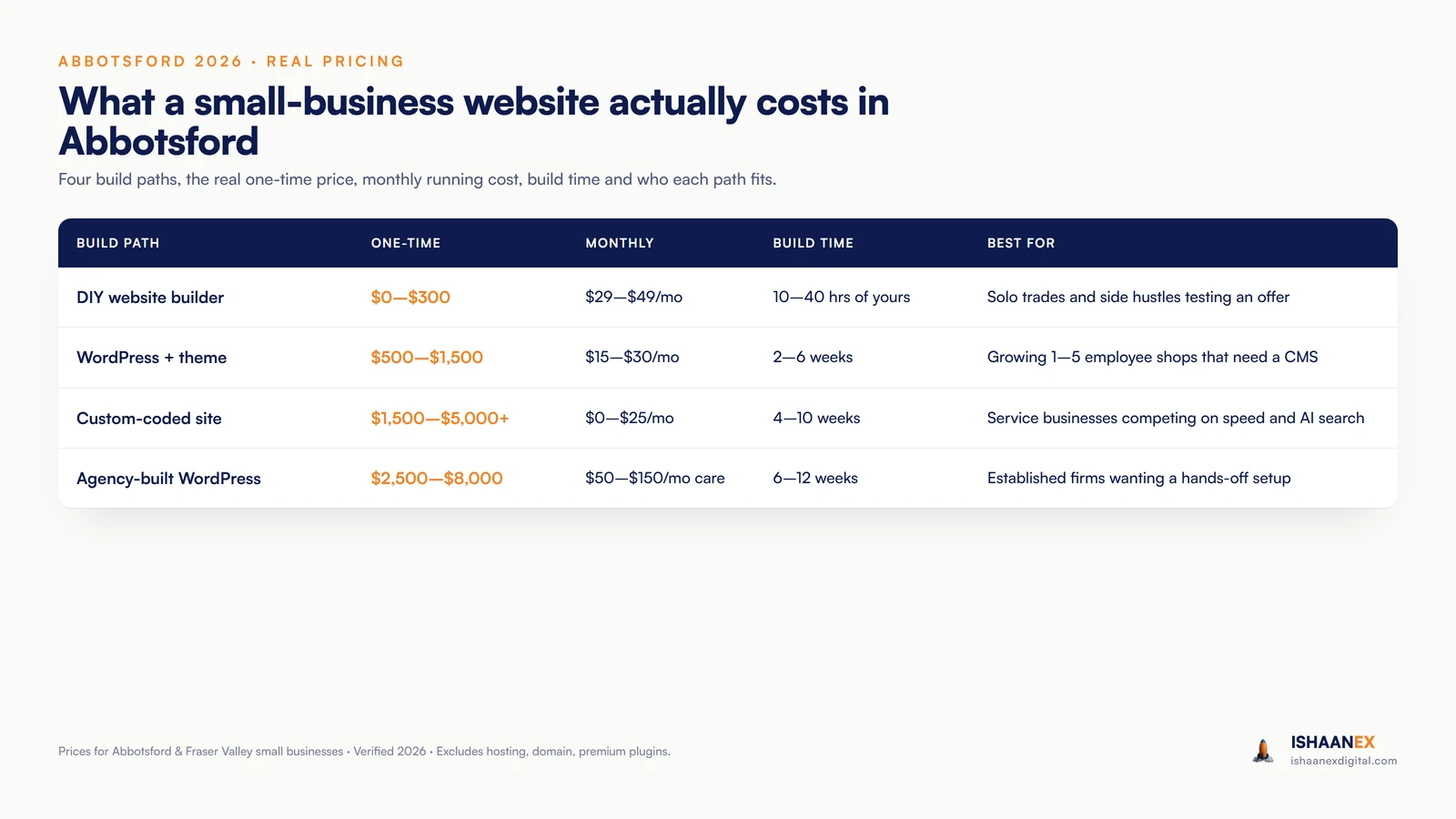
On Reddit's r/smallbusiness, someone recently asked, "How much should it cost for a basic website?" The thread filled with answers, and almost none of them agreed. That is not surprising. Website pricing in Canada in 2026 runs from free to over $30,000, and most cost guides give you a number so vague it is useless.
I am Harman Chahal. I run IshaanEx Digital, an Abbotsford-based agency that builds websites for local service businesses across the Lower Mainland. When I built my first website three years ago on a free platform, I thought the cheapest path was the smartest one. It wasn't. The site barely showed up in Google. That mistake taught me what cheap actually costs you.
This guide breaks down the real small business website cost in Canada — every honest path you can take in 2026: DIY builders, WordPress, custom code, and full-agency builds. I will tell you what each one really costs, what goes into the price, and where each one fits best. I will also tell you exactly what I charge, because most agencies still won't.
How much does a website cost in Canada in 2026?
A small-business website in Canada in 2026 costs between $0 and $30,000+ depending on the build path. A reasonable mid-range build sits at $2,000 to $10,000 CAD one-time. A custom-coded site for a service business that needs to rank well runs $10,000 to $50,000 at the high end, while a simple DIY site can launch for under $500.
If you have searched "website design cost Canada" and gotten wildly different numbers, that spread is why: the gap between a DIY template and a hand-built site is huge. The GoDaddy Canadian cost guide walks through the same range, and the BDC pegs most professional builds at $10,000 to $30,000 for bigger projects. Both are right. They just describe different products.
Cost by build path
| Build path | One-time | Ongoing (per year) | Best for |
|---|---|---|---|
| DIY builder | $0 – $500 | $170 – $1,200 | Solo trades testing an offer |
| WordPress + theme | $100 – $1,500 | $500 – $1,500 | Owners who post often or want full control |
| Freelancer | $1,500 – $7,000 | $500 – $2,000 | A first real site on a tight budget |
| Agency | $5,000 – $20,000+ | $1,200 – $3,500+ | Established businesses needing strategy |
| Custom-coded | $10,000 – $50,000 | $1,000 – $5,000 | Speed and ranking-critical builds |
Cost by type of website
| Type of website | Typical cost (CAD) | What it is |
|---|---|---|
| Landing page | $300 – $1,800 | One page for a single offer or ad campaign |
| Brochure site | $500 – $5,000 | 5–10 pages: services, about, proof, contact |
| Small e-commerce | $2,500 – $10,000 | A store with a modest product catalogue |
| Large e-commerce | $15,000 – $60,000+ | Hundreds of products, integrations, custom checkout |
| Custom design | $10,000 – $50,000+ | Bespoke, hand-built, performance-first |
What an agency actually charges
I publish my prices openly because most agencies do not, and that secrecy is one of the biggest reasons small businesses overpay. Here is what IshaanEx Digital charges.
| Tier | Price | What you get |
|---|---|---|
| Essential | $500 one-time | 3–7 pages, mobile-ready, basic SEO, contact form |
| Growth | $1,000 one-time | 8–12 pages, 6 months of care, schema markup, GBP optimisation |
| Authority | $1,500 one-time | 13–20+ pages, 12 months of care, AI chatbot, AI-search-ready build |
No monthly subscription on the build itself, and no "discovery call to discuss pricing" runaround. You can see my full transparent pricing any time, and if you want the broader BC market, I have a separate custom website cost guide for BC that goes deep on the high-end tiers.
What goes into the cost? The 5 parts of building a website
A website price is really five separate costs bundled together: a domain, hosting, the design and build, security, and SEO. When you understand the five parts, a quote stops feeling like a random number. The GoDaddy Canada guide breaks the journey down the same way.
1. Domain
Your address on the web. A .ca domain runs about $20 CAD a year through a Canadian registrar. This is the cheapest part of the whole project, and you should always register it in your own name so you own it.
2. Web hosting
Where your site lives. Shared hosting starts around $5 a month, and faster managed hosting runs up to $150. Builders like Wix and Hostinger include hosting in their plan, so there is nothing separate to manage.
3. Web design and build
The biggest and most variable cost. Custom-designed pages run roughly $300 to $1,500 each to build. In Vancouver, freelance developers charge about $56 an hour for juniors and $151 for seniors, while full-service agencies in the Abbotsford and Metro Vancouver area charge $100 to $199 an hour.
4. Web security
An SSL certificate keeps the connection safe, and it is often free through Let's Encrypt. Beyond that, security means backups, updates, and patches. On some platforms this is handled for you. On others it is an ongoing job you pay for.
5. SEO
A site nobody can find is a brochure in a drawer. Real SEO and AI search work — page structure, schema, speed, content — is what turns a website into a source of calls. It is the part most cheap quotes quietly leave out.
The cost most people forget: content
Photos and written copy are a real cost, whether you pay a copywriter or spend your own hours. The fastest way to blow a budget is to keep changing the scope after the build starts. Decide your pages and gather your content first, and the price holds steady.
Is a WordPress website cheaper than a custom-coded one?
WordPress is usually cheaper to build on day one — often by $1,000 or more — but the lifetime cost depends on hosting, plugin licences, and ongoing website maintenance cost. Over three years, a well-built custom-coded site often costs less to run, because there is less to maintain.
A real three-year comparison
For an 8-page service-business website:
| Build path | Year 1 | Year 2 | Year 3 | 3-year total |
|---|---|---|---|---|
| WordPress + theme + agency care | $1,200 + $1,800 care | $1,800 | $1,800 | $6,600 |
| Custom-coded (IshaanEx Growth tier) | $1,000 + 6 months care | $300 hosting | $300 | $1,600 |
| DIY builder (your time) | $348/yr + 30 hrs | $348/yr | $348/yr | $1,044 + your time |
WordPress wins on year-one cash. Custom code wins on the three-year total. There is an honest technical trade-off to know about WordPress: if you stack a lot of free plugins, they can break on updates and need manual fixes, and cache can build up so the site slows down over time unless it is managed. The cleaner route is paid plugins plus a page builder. It is real horsepower, with a real learning curve.
Wix or WordPress: which is better for a small business?
Wix is the better pick for a business that wants a site running this weekend with no technical setup. WordPress is better for a business that plans to grow the site over years, wants deeper customisation, or wants full ownership of its files. Both are good platforms — the right answer depends on you.
The thing most people do not know about Wix: it has a built-in system that cleans up cache for you, so the slow-over-time problem is handled automatically, and hosting is built in too. That makes it genuinely easy for a non-technical owner. WordPress gives you more power and full file ownership — you can export your whole site and move hosts — but you need the knowledge to run it well.
If you will be adding pages, blog posts, and features often, WordPress wins on flexibility. If you want simple and self-managing, Wix wins. We have built clients on Wix and never looked back, including a Chilliwack pet-care site that ranks #1 in Google Maps for "dog walking Chilliwack."
Which platform is best for a small business? My take after building on all of them.
After three years of building on every major platform — Hostinger, Wix, WordPress, Shopify, and custom-coded — here is my honest ranking by ease of use. Each one has a sweet spot, and the right pick depends on who you are and what the site needs to do.
Hostinger — the easiest path if you want it cheap and DIY
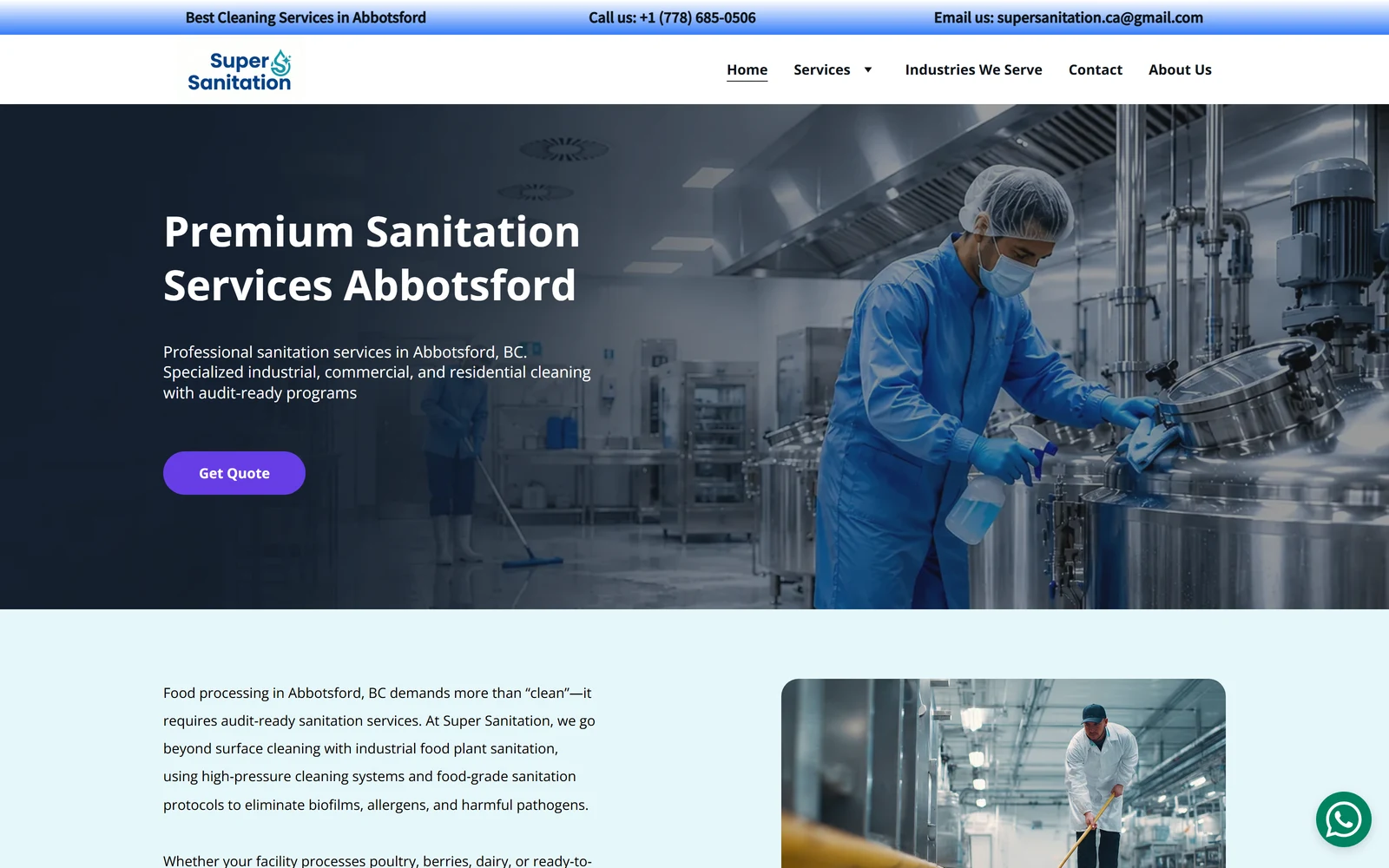
If you want to build it yourself with no experience and very little money, Hostinger is the no-brainer. You only pay for hosting, the templates and the builder come free, and it is pure drag-and-drop. Hosting is built in, so there is nothing extra to set up. It is the easiest platform I have used for a true beginner — and it can rank. One of our Abbotsford clients, Super Sanitation, is built on Hostinger and ranks #1 in Google for "sanitation services Abbotsford."
Wix — easy, with a little technical knowledge
Wix sits one step up. It needs a little more technical comfort than Hostinger, but it cleans its own cache, bundles hosting, and gives you more room to design. For a solo trade or side business that wants more than the bare minimum, it is a friendly, capable choice.
WordPress — powerful, but you need the knowledge
WordPress can power almost anything, from a 5-page site to a full store. But you genuinely need to learn it to build well — plugins to manage, cache to watch, updates to run. It is best for owners who already have website experience, or who hire someone who does.
Custom-coded — my personal preference
Once you can build this way, there is no match. A custom-coded site is fast by default, with no plugins to load and no cache to manage. You have total control over everything. You are an artist with a blank canvas, and the only limit is your imagination. That is why I lean custom for most of our web design in Abbotsford clients, and why DELANA Interiors, built on custom code, ranks #1 in the West Vancouver Map Pack for kitchen renovation.
The honest point underneath all of this: the platform is not what makes you rank. The build and the SEO are. Across our clients, a Hostinger site, a Wix site, a Shopify store, and a custom-coded site all rank at the top of their markets. The right platform is the one that matches where you are right now, not where an agency wants to sell you.
Can I build a website myself — and where do I get design ideas?
Yes, you can build a website yourself. On Hostinger or Wix, a simple small-business site is genuinely doable in a weekend if you have your content ready. The part most first-timers struggle with is not the tool — it is design. A blank builder is intimidating when you do not know what "good" looks like.
So here is something most owners never hear, because it is usually only designers who know these sites. These are free, public galleries where you can browse thousands of real, professional websites and app screens for design ideas before you build:
- Godly — a curated gallery of the best website design on the web.
- Awwwards — award-winning sites, judged on design and creativity.
- Dribbble — where designers post their work; great for layout and colour ideas.
- Mobbin — real app and mobile screens, handy for booking and form flows.
- 21st.dev — a community library of clean, modern interface components.
- Best of Behance — top design projects across web and brand work.
Browse a few, save the layouts you like, and you will walk into your builder with a clear picture instead of a blank page. That one step saves more rebuilds than any plugin.
Can I build a business website for free?
Yes — you can build a real website for $0 using the free tiers of Wix, Hostinger, or developer tools like GitHub Pages. But every free plan comes with limits that hurt you the moment you want to grow. If you want the cheapest path that still looks professional, Hostinger is my pick: you pay only for hosting and get the builder and templates included.
What a truly free plan takes away
- Your domain. Free sites use an address like
yourbusiness.wixsite.com, which kills trust the second someone shares your link. - Forced ads. Free hosts show their own ads on your pages, and those ads can even point to your competitors.
- An SEO ceiling. Free tiers often block sitemaps, schema markup, and analytics — the levers that help you rank.
- No payments. Free plans disable checkout, so you cannot sell.
- Throttled speed. A traffic spike can get your site slowed or suspended.
A free site works as a placeholder while you save up, or for a hobby that does not depend on Google. For a business that wants the phone to ring, it is a step backwards — you save a few hundred dollars and lose far more in missed calls.
Can ChatGPT actually build a website for my business?
ChatGPT can help you plan, write, and even draft the code for a basic website — but it cannot host the site, run it, or make the real decisions for you. It is a strong assistant, not a builder.
What it does well
- Drafts your copy — headlines, service pages, About content, FAQ answers.
- Suggests a sitemap and a sensible page list for your business.
- Generates basic HTML and CSS for a simple page.
- Reviews existing pages and suggests on-page SEO fixes.
What it still cannot do
- Host the site, set up DNS, or manage an SSL certificate.
- Wire up and test a real payment system safely.
- Check the site on real devices to catch mobile bugs.
- Make the business calls — like knowing a 5-page site won't catch a competitor running 90 pages.
If you have built sites before, ChatGPT can cut your work in half. If you never have, it gets you about 30% there and stalls — because the last 70% is decisions and judgment, not typing. That is the part owners hire an agency for.
The real catch: recurring fees and who owns your website
Here is the part the cost guides skip, and it is the thing owners on Reddit worry about most: a $300 site and a $3,000 site look identical on day one. The difference shows up the first time a payment link breaks, a page needs changing, or you try to move hosts — and you find out who actually controls your site.
Two traps cause almost every regret I hear about. The first is recurring fees dressed up as "maintenance" — owners describe quotes with $200 to $400 a month that lock the site to a subscription, where the site only stays online as long as you keep paying. The second is ownership. If a developer holds your domain, hosting, and logins, you are renting your own business presence from them.
From our projects
On every build I run, I set up the domain, hosting, and logins in the client's own name and hand everything over at launch — Search Console, Analytics, and the Google Business Profile included. When I built Super Sanitation in Abbotsford on Hostinger, the goal was simple: show up when food-processing plants search for an industrial cleaner. Today it ranks #1 for "sanitation services Abbotsford," and the owner controls every login. That is the difference between owning a site and renting one.
One more Canadian note: the federal Canada Digital Adoption Program, which used to cover up to $15,000 toward a small-business website, closed its main streams in 2024. So the "just use the grant" advice you may still read online no longer applies — budget as if it is all yours, because it is.
Before you sign anything, ask three questions: Is the build on a known platform? Are the domain, hosting, and logins in my name? And what exactly does "maintenance" cover? Clear answers there matter more than the sticker price.
What is a reasonable price to pay — and what is just cheap?
A reasonable price for a professional 5-to-10-page small-business website in Canada is $2,000 to $10,000 CAD with an experienced freelancer or boutique agency, and $500 to $1,500 if you work with a lean local builder like us. Below about $300, you are usually buying a bare template with no real ranking work. Above $5,000 for a small site, you are often paying for an agency built for clients three sizes bigger than you.
My position is not "I'm the cheapest, so hire me." A low price on its own signals low quality. My position is that the price should be reasonable and backed by proof. The system I have built has ranked my own clients — and my own agency — at the top of competitive markets, and I publish my prices so you can judge for yourself. Reasonable cost plus real results is the only honest way to price this work.
So when you compare quotes, do not just compare the number. Compare what is included — pages, content, SEO, ownership, support — and ask each person to show you a site they built that actually ranks. That single question tells you more than any price tag.
Frequently asked questions about website costs
What is the average cost of a website?
Most small-business websites in Canada cost $2,000 to $10,000 CAD for a professional build in 2026, though the full range runs from $0 for a DIY site to $30,000+ for a large custom one. The Business Development Bank of Canada puts most professional builds at $10,000 to $30,000 for bigger projects. What you pay comes down to the build path, the number of pages, and whether you need e-commerce or SEO built in.
How much does it cost to build an online store?
A small online store in Canada starts around $2,500 to $10,000 CAD to build, and a large or complex store runs $15,000 to $60,000+. Shopify is the common pick — its Canadian plans run $37 to $389 CAD a month on top of your build. The cost climbs with product count, payment and shipping setup, and handling BC PST correctly at checkout.
How long does it take to build a website?
A simple small-business website takes one to four weeks. A larger site with custom design, lots of pages, or e-commerce takes six to twelve weeks. The biggest delay is almost always content — photos, copy, and approvals from your side. We delivered one Chilliwack client her full site in 10 days, four days ahead of the deadline, because she had her content ready.
What ongoing monthly costs come with a website?
Plan for $30 to $200 CAD a month after launch. Typical pieces: domain $1 to $2.50, hosting $5 to $150, an SSL certificate that is often free through Let’s Encrypt, business email $5 to $20 per user, plugin licences $10 to $80, and a care plan at $25 to $100 for light DIY or $150+ for full agency support.
Can I host my own website for free?
Yes — Wix, Hostinger, and GitHub Pages all offer free hosting tiers. But free plans force a branded subdomain like yourbusiness.wixsite.com, show ads you cannot remove, block sitemaps and analytics, throttle your speed, and disable payments. A free plan works as a placeholder while you save up, not as a real business site that needs to rank.
What type of website do I need for my business?
Most local service businesses need a brochure or lead-generation site of 5 to 10 pages — enough to explain services, show proof, and get the phone ringing. You only need e-commerce if you sell products online. A single landing page works for one offer or an ad campaign. Match the type to your goal, not to the biggest package an agency tries to sell you.

Want a real price for your website?
IshaanEx Digital is an Abbotsford-based agency. We build web design in Abbotsford for service businesses across the Lower Mainland — on custom code, WordPress, Wix, Shopify, or Hostinger, whichever fits you. Real client builds you can review live: DELANA Interiors, Super Sanitation, Paws by the River, Scholars Hub.
Tell me what your business does, what your competition looks like in the Abbotsford market, and what you want the website to do. I will give you a real price and an honest timeline, usually inside one call. No discovery-call upsell. No template recycling.